
Showing posts with label Youtube. Show all posts
Showing posts with label Youtube. Show all posts
Monday, December 16, 2019

How To Start A YouTube Channel
In today’s marketing landscape, video content is essential for success.

Although written content has been the basis of content marketing for several years, times have changed. People would much rather watch a video than read pages of content.
In fact, a report from Cisco predicts that video will make up 82% of all internet traffic by 2021. Additionally, thanks to our easy access to smartphones, the average person spends approximately 50 minutes a day watching online videos.
These numbers are certainly impressive, but how do they apply to your content marketing efforts?
With video content as prevalent and popular as it is, it’s the obvious choice for reaching new audiences and growing your business. There are almost 2 billionactive monthly users on YouTube, which gives you enormous opportunity to gain visibility and spread brand awareness.
Successful channels are even eligible to make money from advertisements, providing an additional source of revenue for your business. However, the largest benefits come from implementing video content into your website. Video content is easily shareable, engaging and memorable. With it, you can increase dwell time and boost your SEO, while also enjoying more traffic to your website.
Below, we’ll walk you through the steps of starting your YouTube channel, and provide you with additional tips to set yourself up for success.
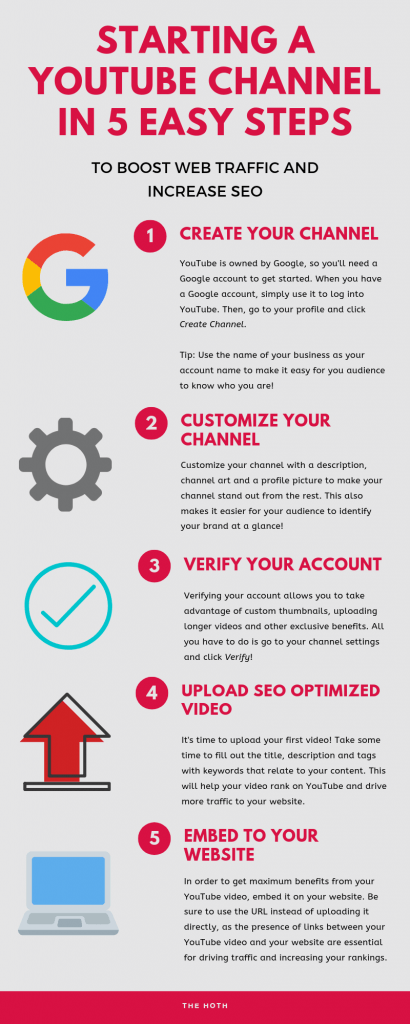
Step 1: Create Your Channel
The first step to starting a successful YouTube channel is creating it!
In order to do this, you will need a Google account. YouTube is owned by Google (this is why YouTube is so instrumental in boosting your SEO), so you will use your Google account to access and manage your YouTube channel.
Once you’ve got your Google account information ready, all you have to do is head over to YouTube and log in with that information.
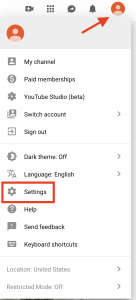
Once you’re logged in, click the account thumbnail icon in the top-right corner of the screen to open the drop down menu. From here, click the settings icon to go into your account settings.
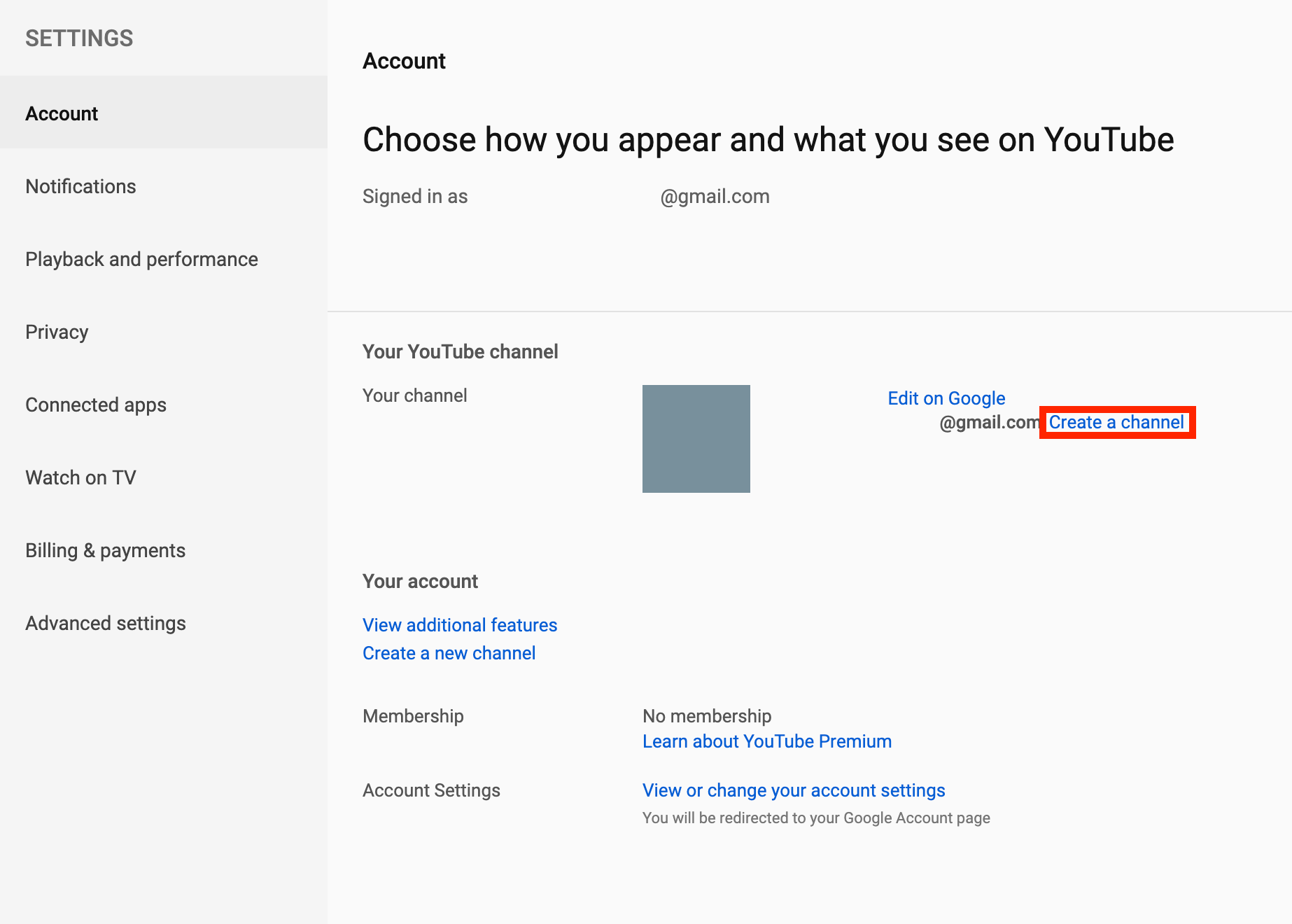
In your account settings, there will be an option to create a channel.
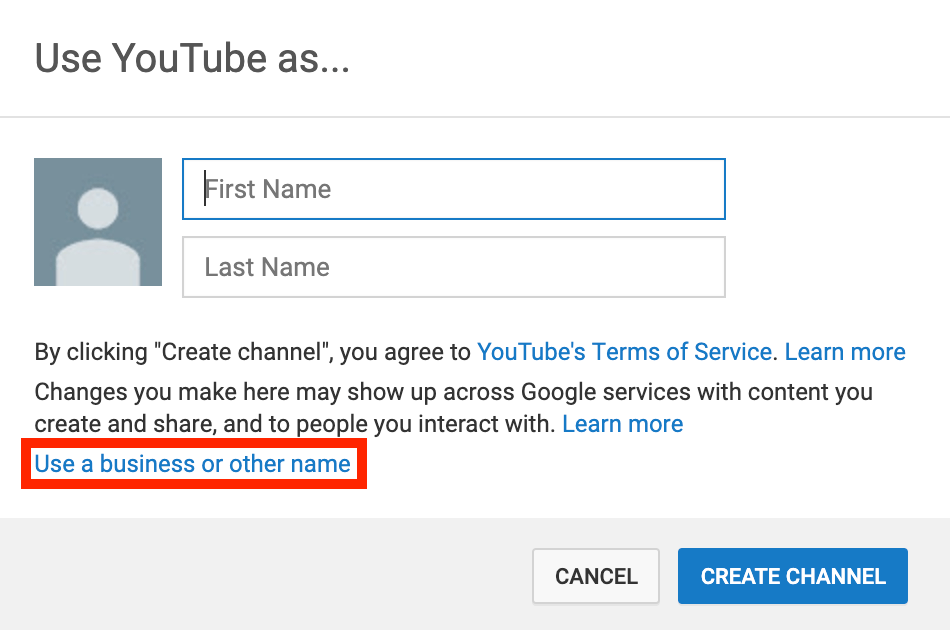
It will ask for your name, but if this account is for your business, you’ll want to choose the option that says Use a business or other name.
You will then be prompted to enter the name of your YouTube Brand Account. Use the name of your business or something similar. Remember, this is how audiences will identify your channel and the people behind it. After you have confirmed your account name, your YouTube channel has officially been created!
Step 2: Customize Your Channel
After creating your YouTube channel, the next step is to customize it to make sure that your channel stands out from the rest.
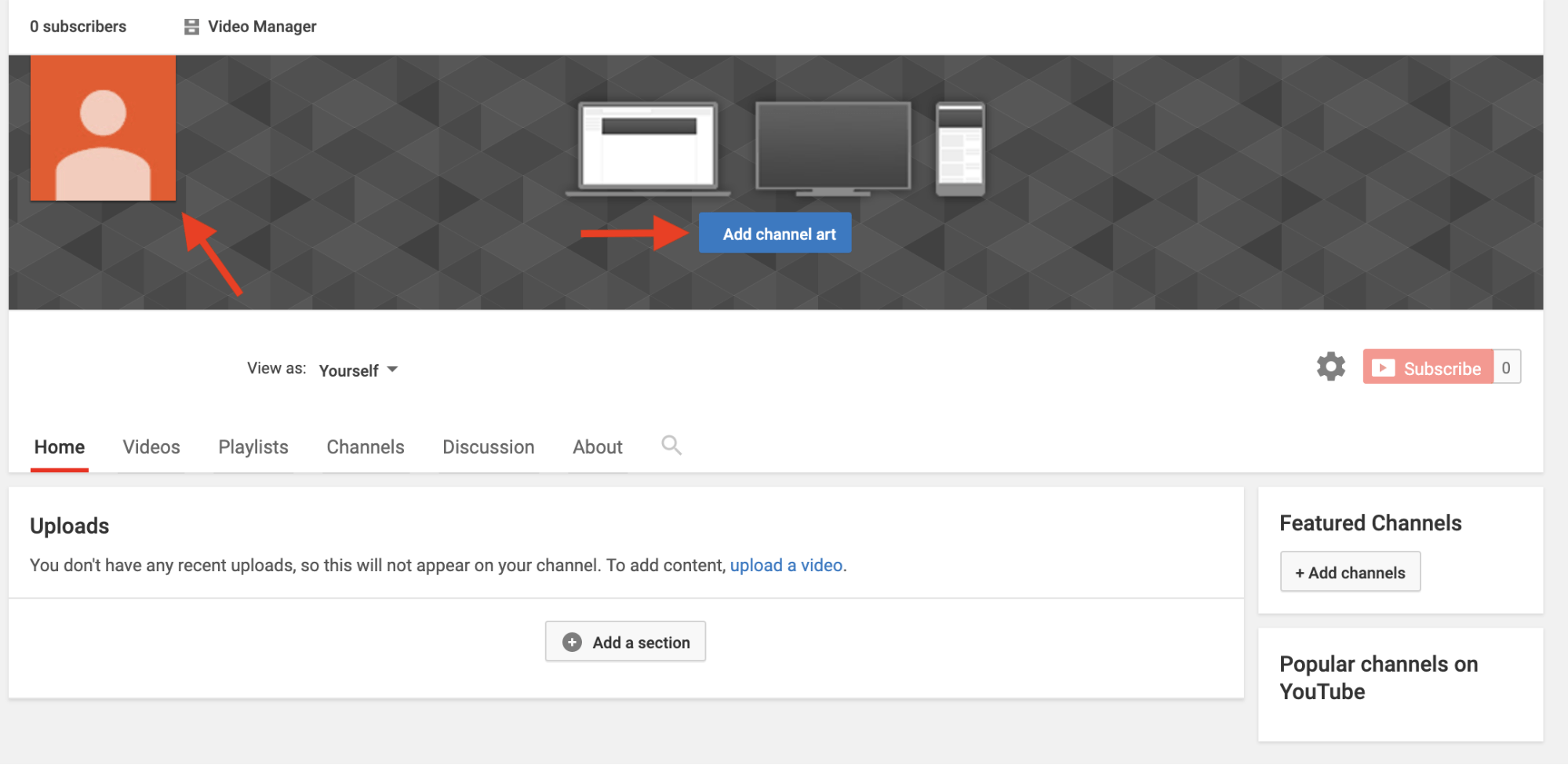
You can upload photos to your channel and your account icon, making it easy to identify your brand at a glance.
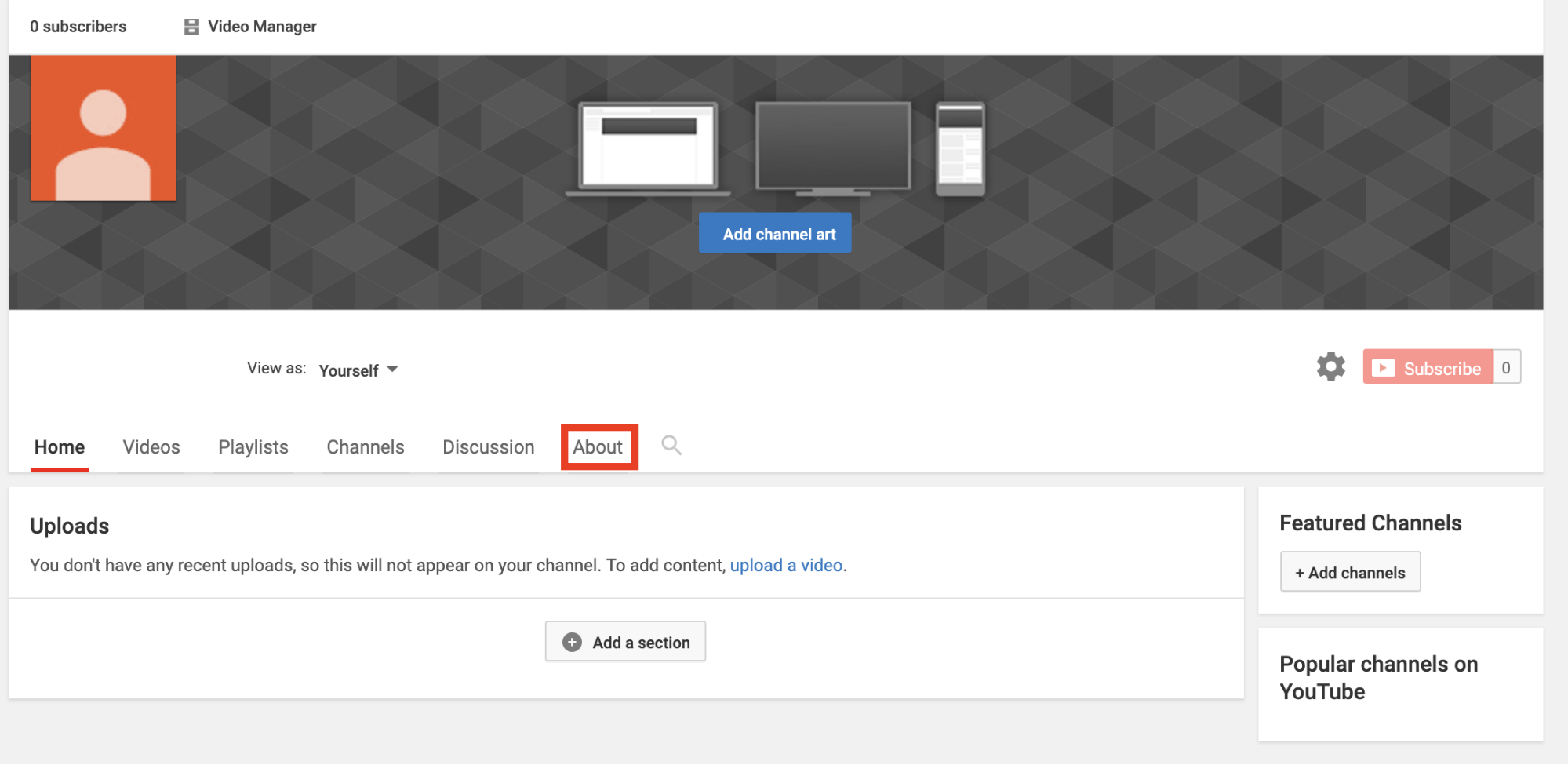
After choosing some photos that fit your channel, click the About tab to add more details.
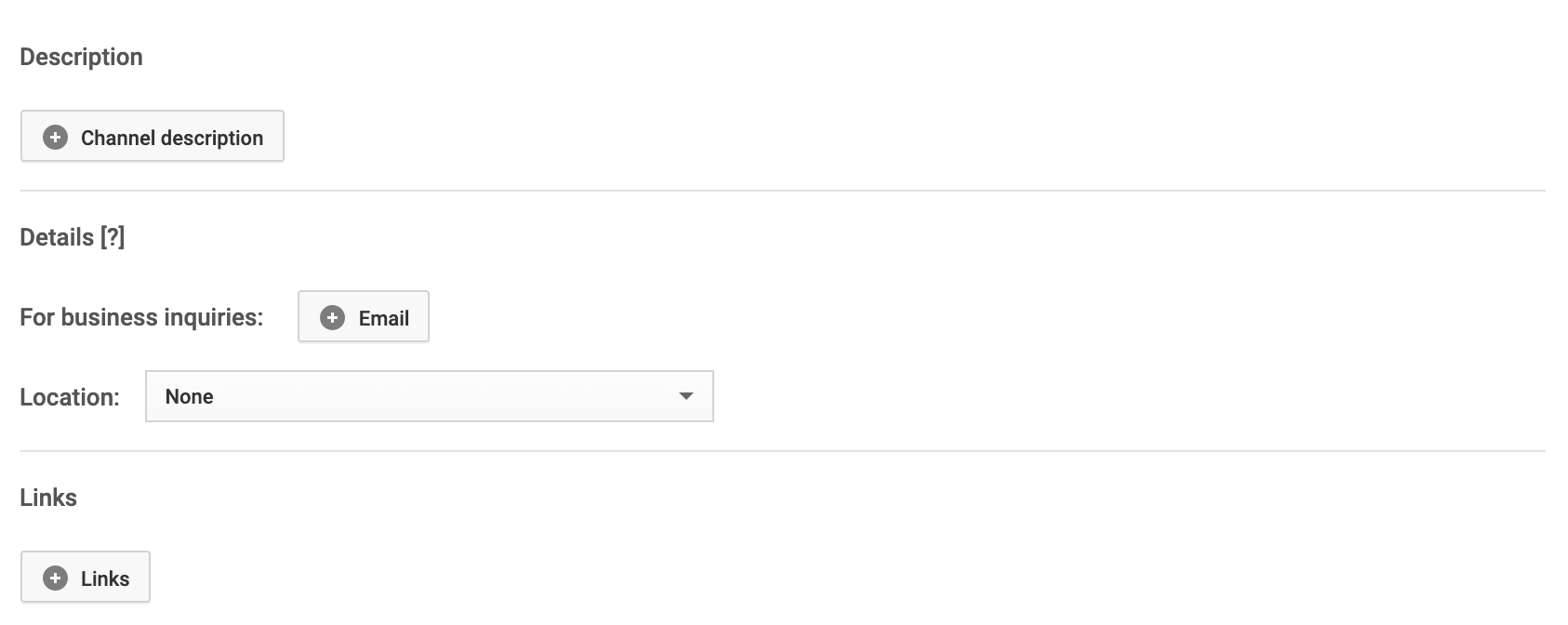
In the About tab, you can add a description of your channel. This is a great opportunity to tell your audience what you’re all about.
You can also add contact information or links to your website, which will give prospective customers the resources they need to easily reach you.
Step 3: Verify Your Account
Once your account is created and customized, you’ll want to verify it so you have full access to benefits like custom thumbnails and the ability to upload longer videos.
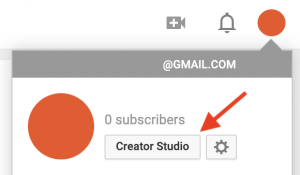
To verify your account, click on the account icon to bring up the drop-down menu, then click on Creator Studio.
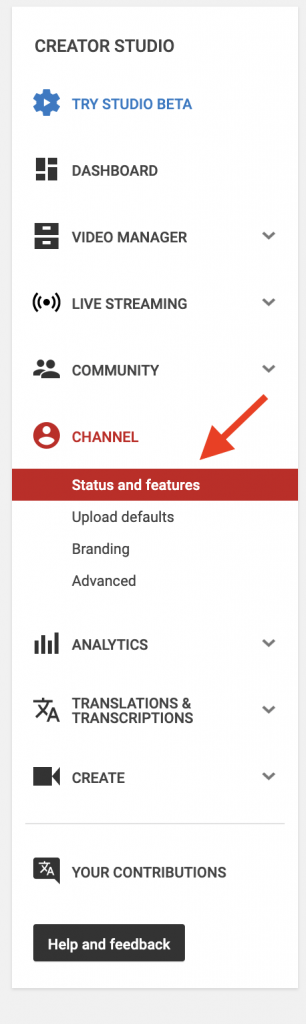
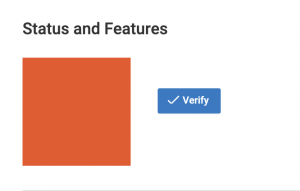
From here, click on Channel and then Status and features.
Then, all you have to do is click the Verify button!
Step 4: Upload SEO Optimized Video
Now that you’ve got your channel set up, it’s time to start uploading videos!
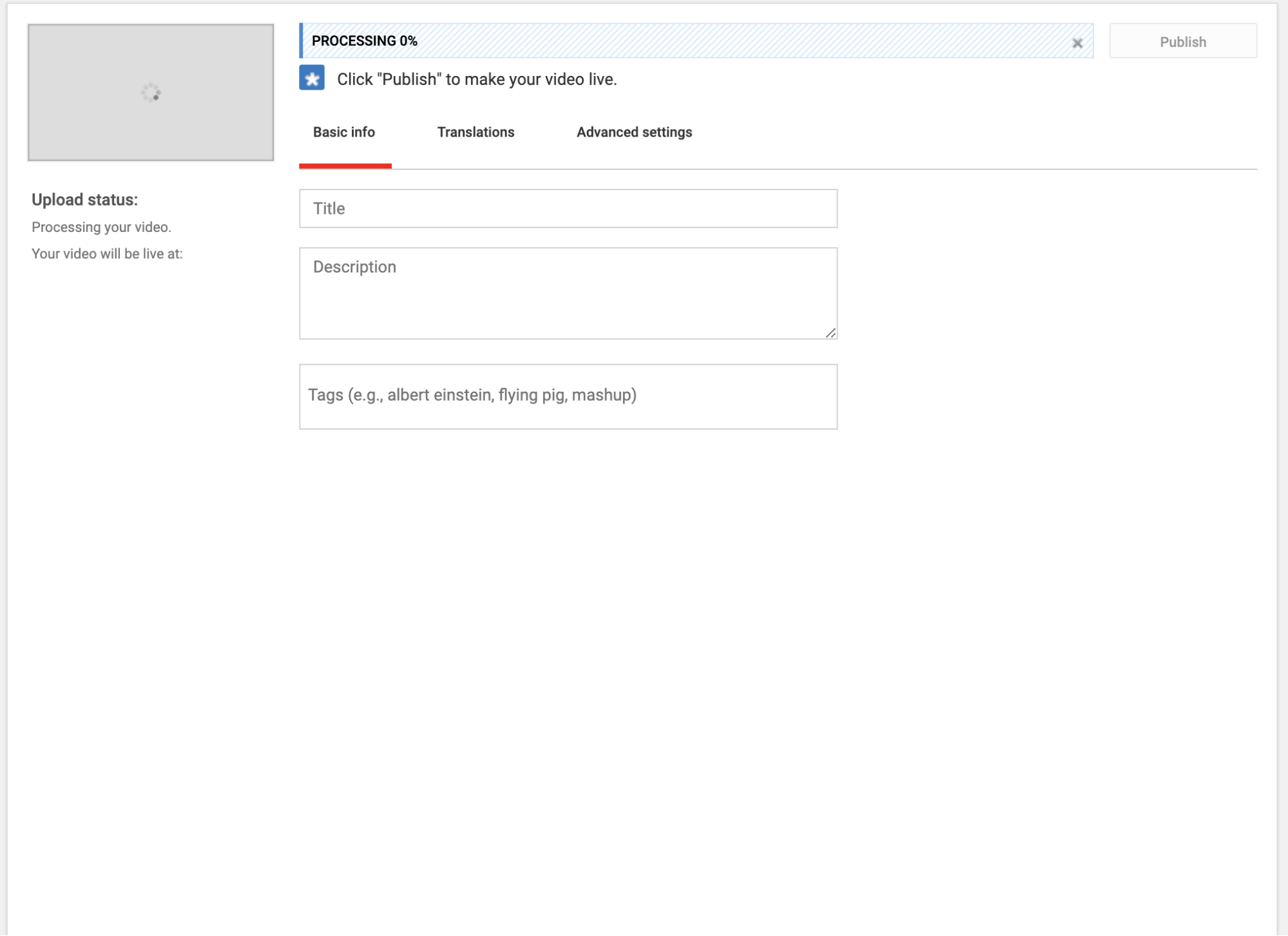
With YouTube, uploading videos is as easy as clicking the upload button and dragging your video onto the screen.
As your video uploads, you’ll have the chance to add a title, description and tags to the video.
These details are incredibly important for SEO and ensuring that your content reaches its intended audience. Here are some tips for helping your video rank:
- Title – Your video title should be 5-10 words long. It should also include a keyword at the front of the title, which tells YouTube what the video is about. With this information, YouTube will suggest your video when people type your chosen keyword into the search bar. Adding other relevant information, such as the year or “how to”, can also help.
- Description – Your description should be about 150 to 200 words. In order to rank your video higher on YouTube, you should include the keyword that you used in your title multiple times throughout the description, and especially in the beginning. You can also link back to your website in the description, which increases the chance that your viewers will visit your website.
- Tags – The tags help YouTube categorize your video and suggest it to viewers who are watching related content. You should use your keyword here, too. You only need about five tags, any extra tags will only confuse YouTube. In addition to your main keyword, you should include a few alternative keywords that are similar to your main keyword. Then, include a few broader terms that relate to your keyword.
- Thumbnails – Thumbnails don’t affect your SEO or video ranking, but they certainly encourage people to click on your video instead of the videos above or below it. The best way to grab someone’s attention is using a custom thumbnail. Adding text, images or other elements to the thumbnail can make your video look much more appealing.
Step 5: Embed Videos to Your Website
Once you’ve uploaded your SEO optimized video, you’ll want to embed them on your website to further increase your traffic and your rankings.
Don’t know how to embed a video on your WordPress? It’s simple!
First, log into your WordPress dashboard and either create a new post or navigate to the post that you would like to add your video to.
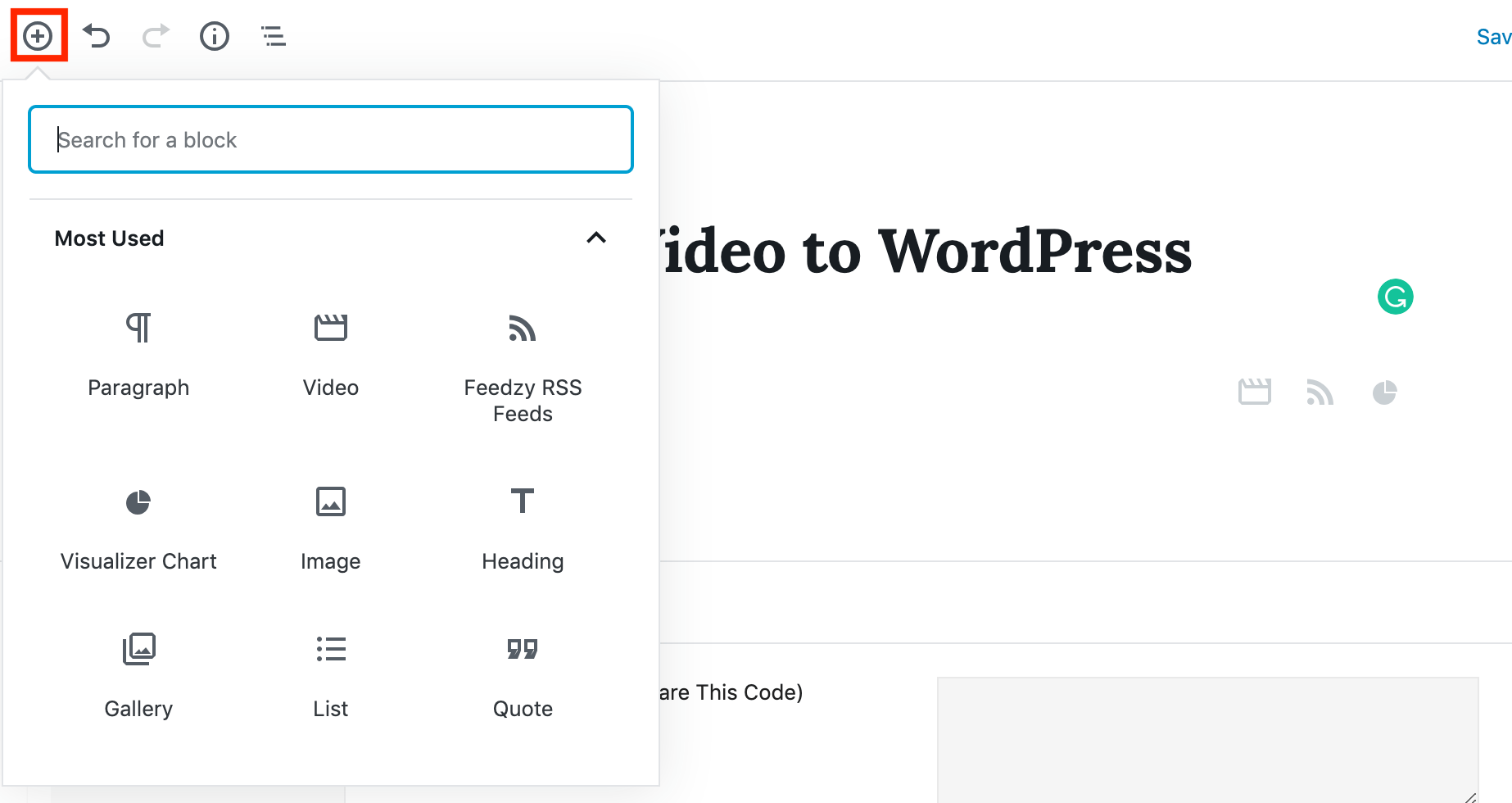
Then, click the plus sign in the top-left corner to add a block to the current page.
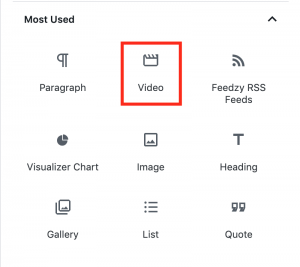
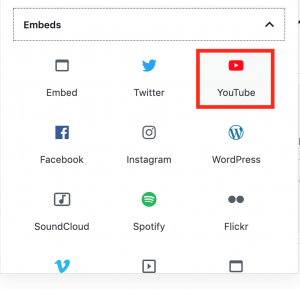
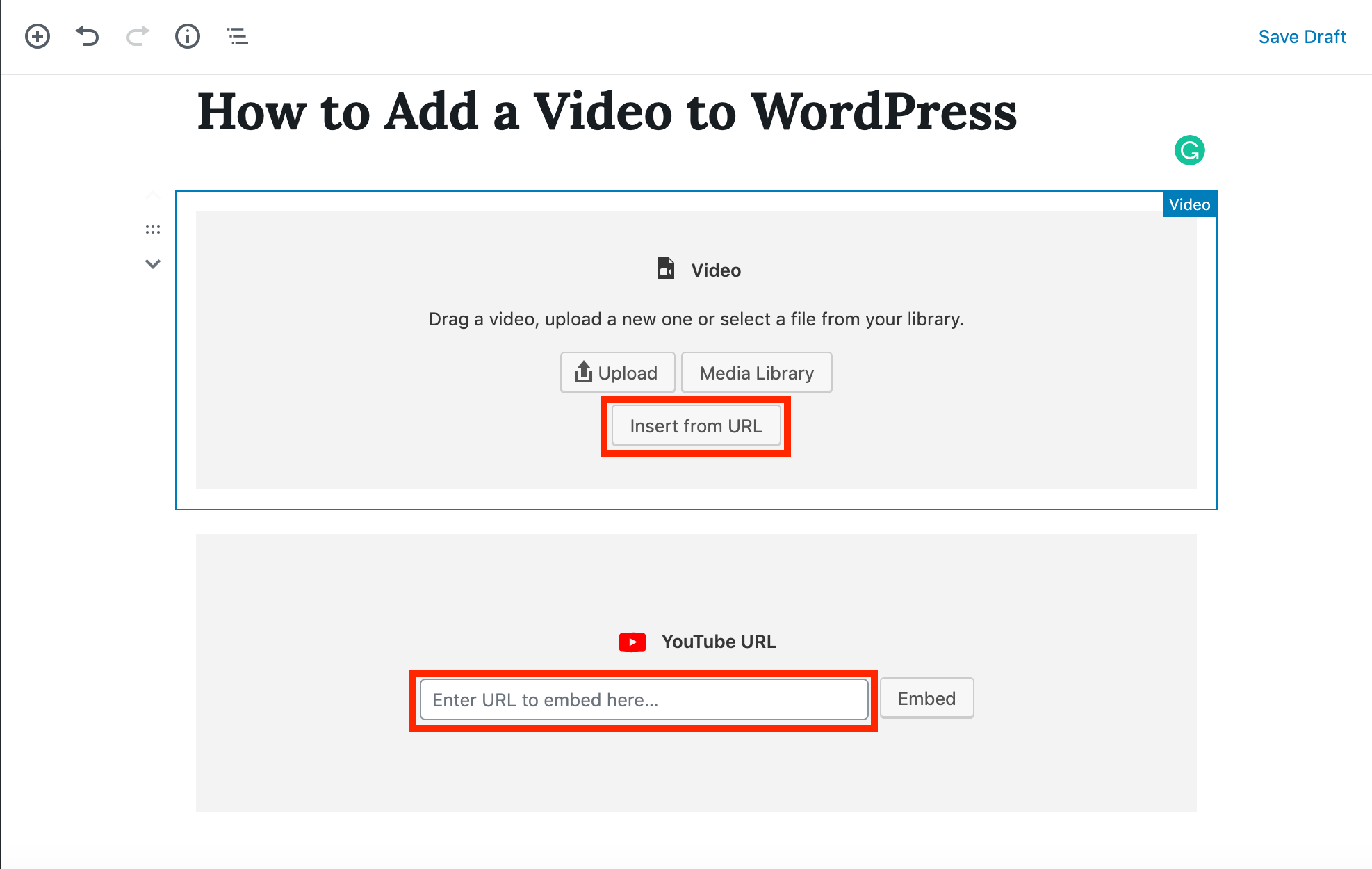
Here, you will have the option of inserting a Video block,
…or a block specific to YouTube.
After inserting the new block, you will be able to embed your video using its YouTube URL.
It’s important to use the URL here instead of uploading your video directly to your site. If you upload directly, you won’t get any SEO benefits! The presence of links between your website and your YouTube video are essential for driving traffic and increasing your rankings.
Conclusion
Like any marketing strategy, you need to be consistent in your efforts in order to achieve the best results. Upload videos regularly to keep your audience engaged and continue to enhance your SEO benefits.
Need help producing SEO optimized videos?
Whether you lack equipment, time, or expertise, we have the perfect solution with HOTH Video.
With HOTH Video, we take care of the entire production process for you. From scriptwriting to post-production, we build your video from the ground-up, optimizing your video for YouTube and SEO along the way. All you have to do is upload and reap the rewards.
Friday, December 13, 2019
Top 10 Traffic Strategies For New Bloggers
Nowadays competition is stiff in almost any niche! If you're a new blogger you really can't expect to become world famous quickly or just because you blog regularly.
As a new blogger you need to know that people are not watching everything you do. Some people don't even care and most aren't aware of you or your business.
This is why so many new bloggers are struggling with traffic. Don't live in a bubble, take action and change your situation.
A good way to start is to build traffic the right way. Follow these 10 Traffic Strategies and start driving traffic to your site today!
Traffic Strategy #1 Distribute Viral eBooks for New Bloggers
New Bloggers creating an eBook that you write and produce once can drive traffic to your site for a very long time. How you ask? By putting your name, website address and email or phone number on each page.
Pick a topic that your readers would happily pay for. Then write the eBook and then give it away for FREE! Yes, I said FREE! Have the topic relate to what you are doing, what your website is about. Tell people who get your eBook to share it with their friends, share it with everyone they know.
Remember all of your contact information is listed on each page of your eBook. This will bring traffic to your website. People will want to see what else you have to share with them. They will come to your site because they received this great eBook from you for FREE!
Traffic Strategy #2 Self Promotion for New Bloggers
There are so many little things that new bloggers can do to help promote you that many can be overlooked. Everything you can do to promote you, you can also use to promote your website which is better.
Keep in mind you may not be able to drive large amounts of traffic with these methods, you just never know what will happen with those handful of visitors.
Add a link to your website in your email, share links to your posts and of course your business cards are just a few ways to self-promote you and your website.
Traffic Strategy #3 Quality Content for New Bloggers
Now as a new blogger you may think that quality content has nothing to do with getting traffic to your website. The impact of quality content can be very substantial.
Visitors come to your website to find out what you have to offer and read your information. If they like what you have, what they read, the will subscribe to your RSS feed, sign up for your newsletter and of course tell their friends about your great website/blog.
Remember content is king! Blogs are a fantastic tool for creating quality content on a regular basis. Each time your add a post you increase your blog content which is turns is creating a smorgasbord of relevant content that Google and other search engines really love!
Traffic Strategy #4 Article Marketing for New Bloggers
As a new blogger you may think why do I need to write article? I've been told article marketing no longer works! There are far too many articles out there, what could I possibly have to say that hasn't already been said before?
I personally use article marketing to drive traffic to my website, to increase the visitors to my website/blog. Some of them (the visitors) will turn into customers/clients. The time spent writing and promoting the articles is time well spent.
New Bloggers article marketing will continue to work as long as people need information. Think...how you can as a new blogger fit in by contributing that information...into articles.
Article marketing is one of my favorite traffic strategies which does not take months to see results. You can start to generate traffic within days. Write articles that are targeted to your market, your niche. Submit your articles to the top 5 to 10 article sites including your name and website url.
Traffic Strategy #5 Social Networking for New Bloggers
Social Networking sites are popping up everywhere. You can join groups of like-minded people that are bloggers or entrepreneurs.
As new bloggers don't let all the social networking sites overwhelm you! A few of the top sites to join are Facebook, Twitter, LinkedIn and YouTube. Start with these first and then add more later when you get comfortable.
As a new blogger it is important to remember is start with your profile, invite your friends and start connecting with likeminded people.
You have a website/blog it is important to not only create a personal Facebook page; you also need a Fan Page for your business. Facebook Fan Pages are really starting to take off as a method of traffic generation for your website/blog.
Keep in mind start with a couple social networking sites...get to know them, how they work etc. Get really good with those networks before joining more. Quality time is more important than quantity. As new bloggers joining a ton of social networks and not participating will not generate traffic. You will feel overwhelmed and just give up.
Social Networking only works if you participate regularly...Relationshipping with people. This is a relationship building business.
Traffic Strategy #6 SEO and Keywords for New Bloggers
What you write whether articles or content for our website/blog you need to use relevant keywords. A keyword density of 3-8% is a good target for getting higher page rankings in Google and other search engines.
Research your keywords to find the most popular words used in the search engines for you target market, your niche. Use tags and keywords in your posts will help you move up in the search engines.
All photos and also add an alt tag using your keywords helps in the search engines.
As you write your posts you want to optimize your pages for both your human readers as well as search engines. Some say that if you make it work and rank for your keywords that your website/blog will be a search engine magnet.
You can write naturally and the search engines will notice if you know which keywords to target. Search engines do need time to work so don't expect instant results.
Traffic Strategy #7 Social Bookmarking for New Bloggers
Being a new blogger you may be wondering what is Social Bookmarking?
How do I use Social Bookmarking?
What do I Social Bookmark?
With Social Bookmarking you submit your posts to the top social bookmarking sites. This allows others who are members of those sites to visit your website/blog. Taking this time to submit your posts to social bookmarking is a simple way to quickly boost traffic to your website/blog.
Social Bookmarking is all about people sharing their posts or posts that interest them at your website/blog. In other words your visitors if they like your posts they can also bookmark your posts...they can share with others through social bookmarking.
Put a plugin on your website/blog to the top social bookmarking sites, this will help your visitors to bookmark your posts or pages quickly and easily.
WordPress has several different social bookmarking plugins to use...one favorite is Sexy Bookmarks. Sexy Bookmarks has several of the top site to pick from. Add this plugin to your posts and pages and make it easy for your visitor to bookmark your website/blog.
Traffic Strategy #8 Document Sharing for New Bloggers
New Bloggers every document, article, post that you write is by my definition a marketing document. These documents present an image of your business, your website/blog.
It's important to reuse your articles and posts...turn them into PDF's and upload them to the top 10 to 15 document sharing sites. Why you may ask?
The reason is the top document sharing sites have thousands of people visiting daily, looking and reading and finding your articles and will in turn visit your website/blog for more information.
Each article needs to have your contact information, your name, your website/blog url. Set up your profile at each of the document sharing site with your website/blog url as well.
What you are doing is creating backlinks to your website/blog and generating traffic.
Sharing information is what they internet is all about. Document sharing sites are a boom and a great way to generate FREE traffic to your website/blog. Be creative add pictures, increase the font size of your header and add color to your articles before you turn them into PDF's.
Traffic Strategy #9 Video Marketing for New Bloggers
Listen up new bloggers Google and other search engines love videos! Video on your website is becoming more and more an effective method to help continue to grow your business, your online presence.
Here's some trivia. A school of business stated a well-produced video increases information retention by 50% and it also speeds up buying decisions by 72% over a printed brochure.
Video marketing is quickly becoming the medium for branding and online communications. This is an important traffic strategy that you need to incorporate into your business put on your website/blog.
The most popular video marketing websites is YouTube which is owned by Google! See why Google loves videos?
Produce your quality videos; upload to YouTube plus at least 10 to 15 other top video marketing sharing sites and of course your website/blog. Always making sure your website/blog url is listed in your video. You want to send people back to your website/blog. This is also creating quality backlinks to your website/blog and this is generating free traffic.
Traffic Strategy #10 Syndicate Your Blog for New Bloggers
Setting up an RSS feed and putting a button on your website/blog makes it easy for you visitors to read your blog each time you publish new content.
As a new blogger it's important to give your visitors ways to know you've added new content. You don't want to rely on people's memory, to remember where your website/blog is located. To remember to come back now to your website/blog; then to visit and see if you have add new content or not, everyone is busy so give them a way to remember!
For new bloggers and all bloggers who are growing a business online, making money by selling products or services, visitors are important and returning visitor the lifeline of your business.
Setting up an RSS feed for you website/blog is very quick and easy and another avenue for generating FREE traffic to you website/blog.
Conclusion to Traffic Strategies for New Bloggers
I want you as new bloggers to know that there are several more ways to promote your website/blog, to generate more traffic than what was mentioned in this article. It is just a matter of creativity and diligence.
Some traffic strategy methods work better than others. Some traffic strategies sources will send and generate more traffic for you website/blog.
Remember all traffic strategies take time don't expect overnight riches or millions of visitors. Consistency is important, don't just do each of these traffic strategies once or partially and expect tons of traffic. You will see traffic and it will continue to increase as long as you continue to follow the traffic strategies you put into place.
Regular traffic to your website/blog will continue and will increase if you as new bloggers continue adding new quality content to your website/blog and if you consistently continue these and other traffic strategies. I know I said that before but it is worth repeating.
Barb Sibbing is a Internet Strategy and Social Media Coach, offering proven techniques and strategies to help grow a successful business. Let's work together to create your social media business system and get you online by design. Barb will build the foundation of social media tools that are a fit for you, empowering you to focus on building the relationships that are the essence of your success. Sign up for Barb's newsletter and Grab Your FREE WordPress Video Series and 36 page E-Book...How To Set Up Your WordPress Blog... Delivered FREE to Your Inbox Right Now... at Barb Sibbing How might I add value to your journey today? Building Your Online Business System!
Article Source: http://EzineArticles.com/5553381
Friday, December 6, 2019
Tuesday, November 12, 2019
Subscribe to:
Posts (Atom)